> ## Documentation Index
> Fetch the complete documentation index at: https://docs.deshima.cloud/llms.txt
> Use this file to discover all available pages before exploring further.
# インテグレーション実装・AWS連携
> DeshimaによるAWSリソース自動設定と、手動実装の両方を解説します。Deshimaを使う場合、コードを書かずにインテグレーション実装が完了します
## 概要
AWS Marketplaceのインテグレーション実装では、購入者がサブスクライブした際の顧客登録と、エンタイトルメント(契約内容)の確認を実装する必要があります。
**Deshimaを使う場合、この実装は不要です。** AWSセラーアカウントを連携するだけで、必要なAWSリソースが自動設定されます。
## Deshima AWS連携の手順
Deshimaホームに「AWS連携状態」エリアがあります。「AWS連携設定へ」ボタンを押下してAWS連携設定画面に進みます。
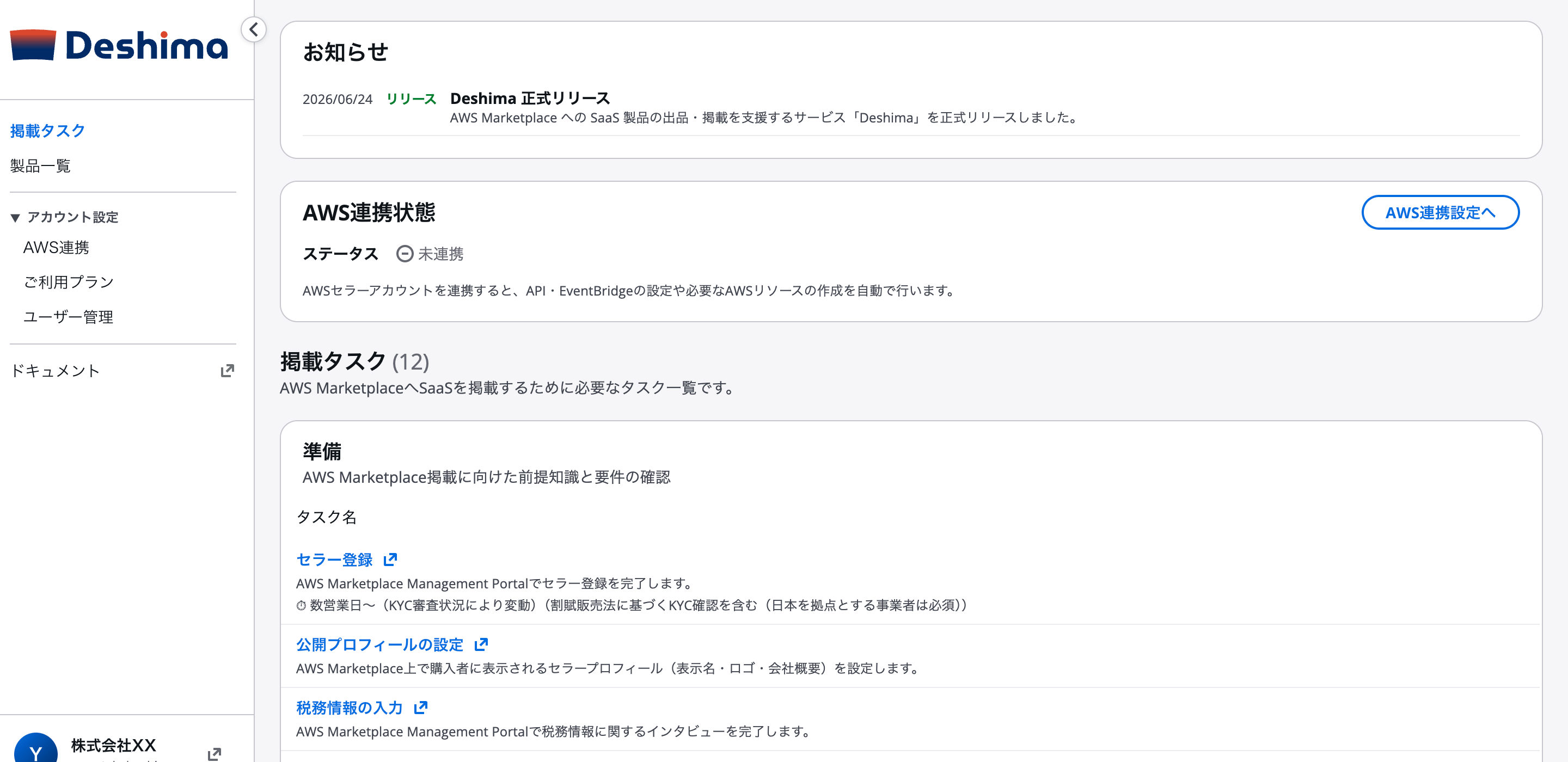 AWS連携設定画面の手順に従って操作します。
1. **出品先のAWS Seller Accountにログインした状態**で「CloudFormationを開く」ボタンを押下します(us-east-1リージョンにスタックが作成されます)
2. AWSコンソールのCloudFormation画面でスタックを作成します
3. スタック作成完了後、「出力」タブを開きます
4. `RoleArn` の値をコピーします
AWS連携設定画面の手順に従って操作します。
1. **出品先のAWS Seller Accountにログインした状態**で「CloudFormationを開く」ボタンを押下します(us-east-1リージョンにスタックが作成されます)
2. AWSコンソールのCloudFormation画面でスタックを作成します
3. スタック作成完了後、「出力」タブを開きます
4. `RoleArn` の値をコピーします
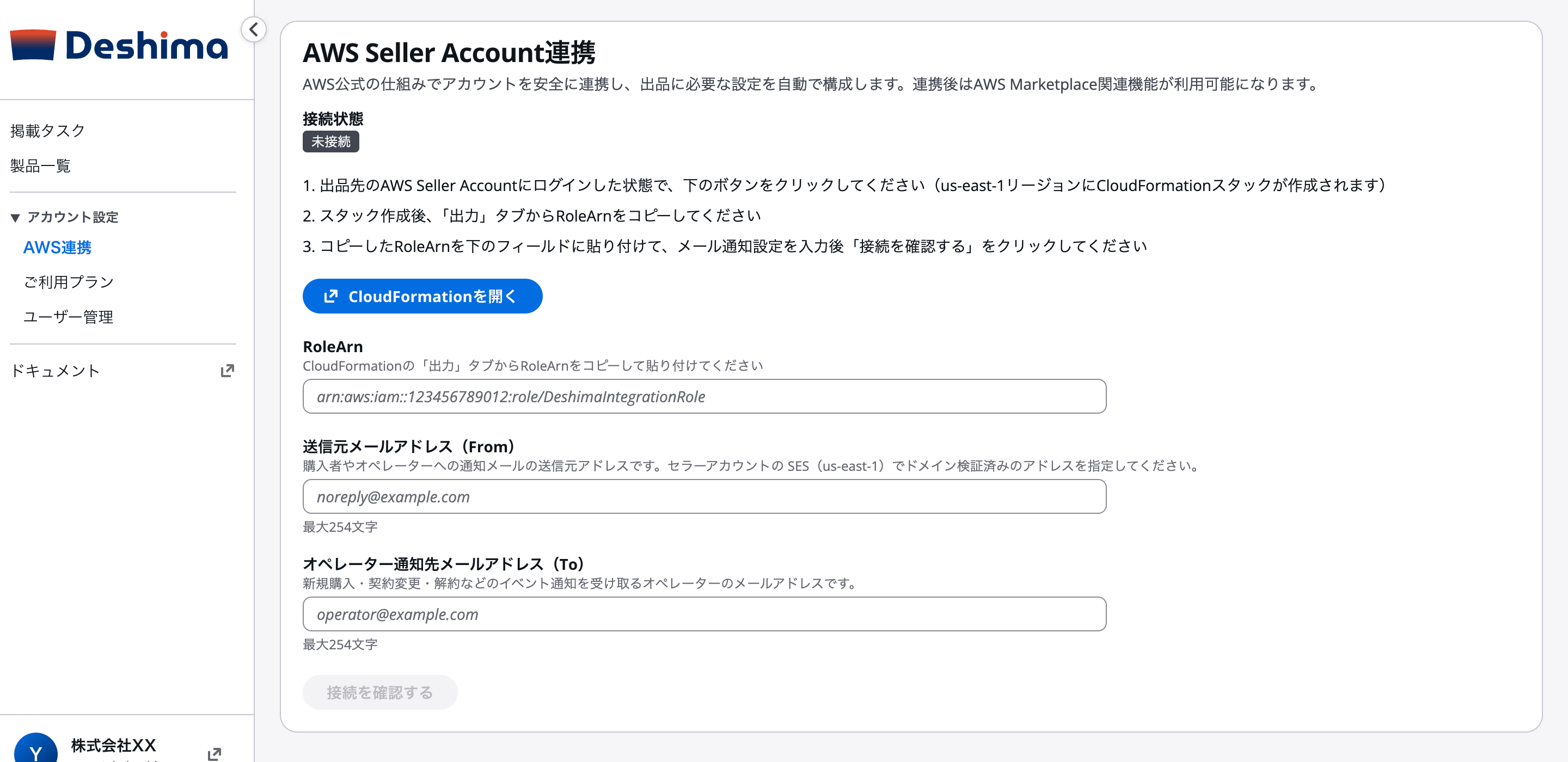
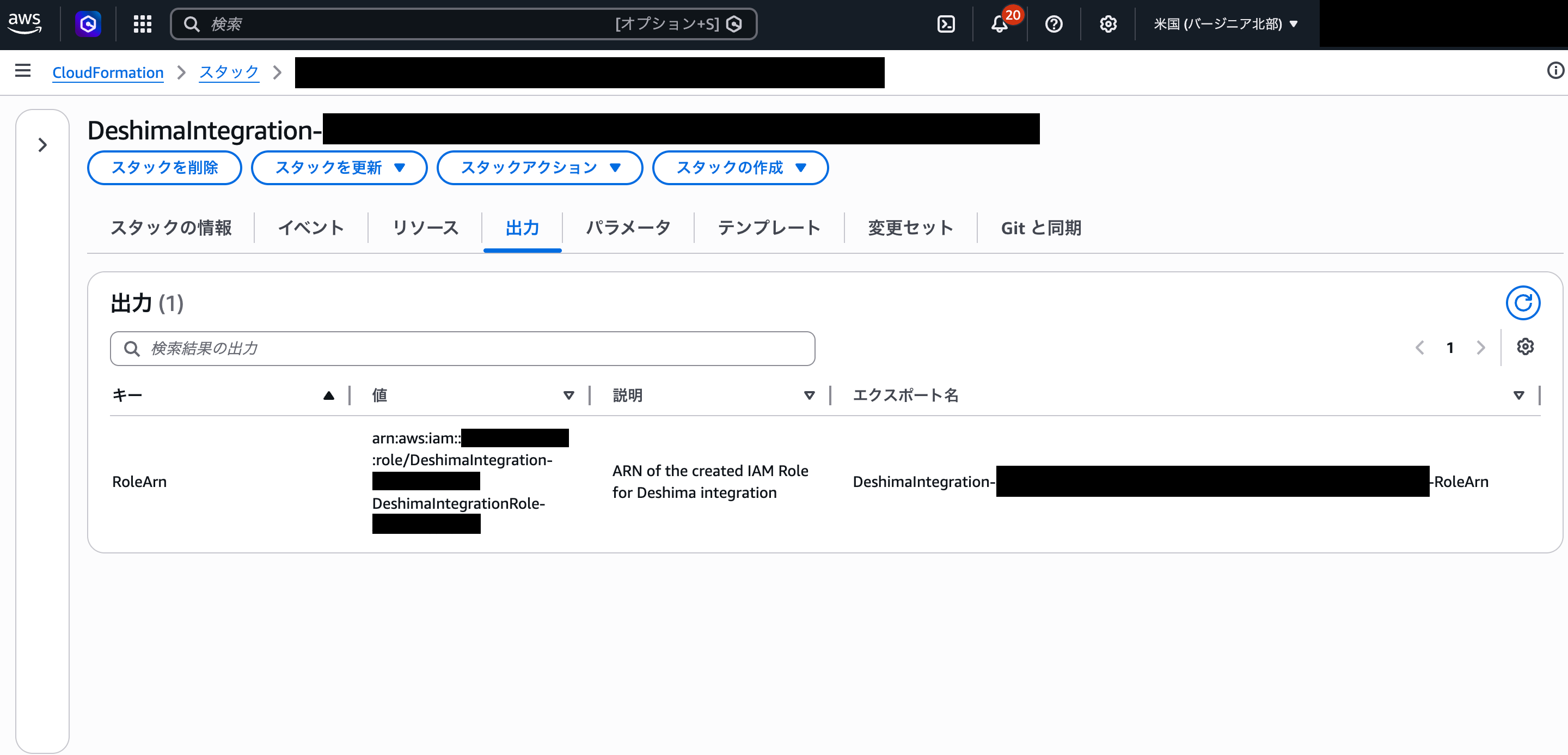 Deshimaの連携設定画面に戻り、以下を入力して「接続を確認する」ボタンを押下します。
| 入力項目 | 内容 |
| -------------------- | ------------------------------------------------------------------------------------ |
| **RoleArn** | CloudFormationの出力タブからコピーした値(`arn:aws:iam::XXXXXXXXXXXX:role/DeshimaIntegrationRole`) |
| **送信元メールアドレス** | 購入者・オペレーターへの通知メールの送信元アドレス |
| **オペレーター通知先メールアドレス** | 新規購入・契約変更・解約などのイベント通知を受け取るメールアドレス |
**送信元メールアドレスにはAmazon SESの本番環境への移行(サンドボックス解除)が必要です。** セラーアカウント上のSESを使用するため、事前にサンドボックスモードを解除してください。未解除の場合、購入者への通知メールが送信されません。
[Amazon SES 本番環境への移行 →](https://docs.aws.amazon.com/ja_jp/ses/latest/dg/request-production-access.html)
Deshimaの連携設定画面に戻り、以下を入力して「接続を確認する」ボタンを押下します。
| 入力項目 | 内容 |
| -------------------- | ------------------------------------------------------------------------------------ |
| **RoleArn** | CloudFormationの出力タブからコピーした値(`arn:aws:iam::XXXXXXXXXXXX:role/DeshimaIntegrationRole`) |
| **送信元メールアドレス** | 購入者・オペレーターへの通知メールの送信元アドレス |
| **オペレーター通知先メールアドレス** | 新規購入・契約変更・解約などのイベント通知を受け取るメールアドレス |
**送信元メールアドレスにはAmazon SESの本番環境への移行(サンドボックス解除)が必要です。** セラーアカウント上のSESを使用するため、事前にサンドボックスモードを解除してください。未解除の場合、購入者への通知メールが送信されません。
[Amazon SES 本番環境への移行 →](https://docs.aws.amazon.com/ja_jp/ses/latest/dg/request-production-access.html)
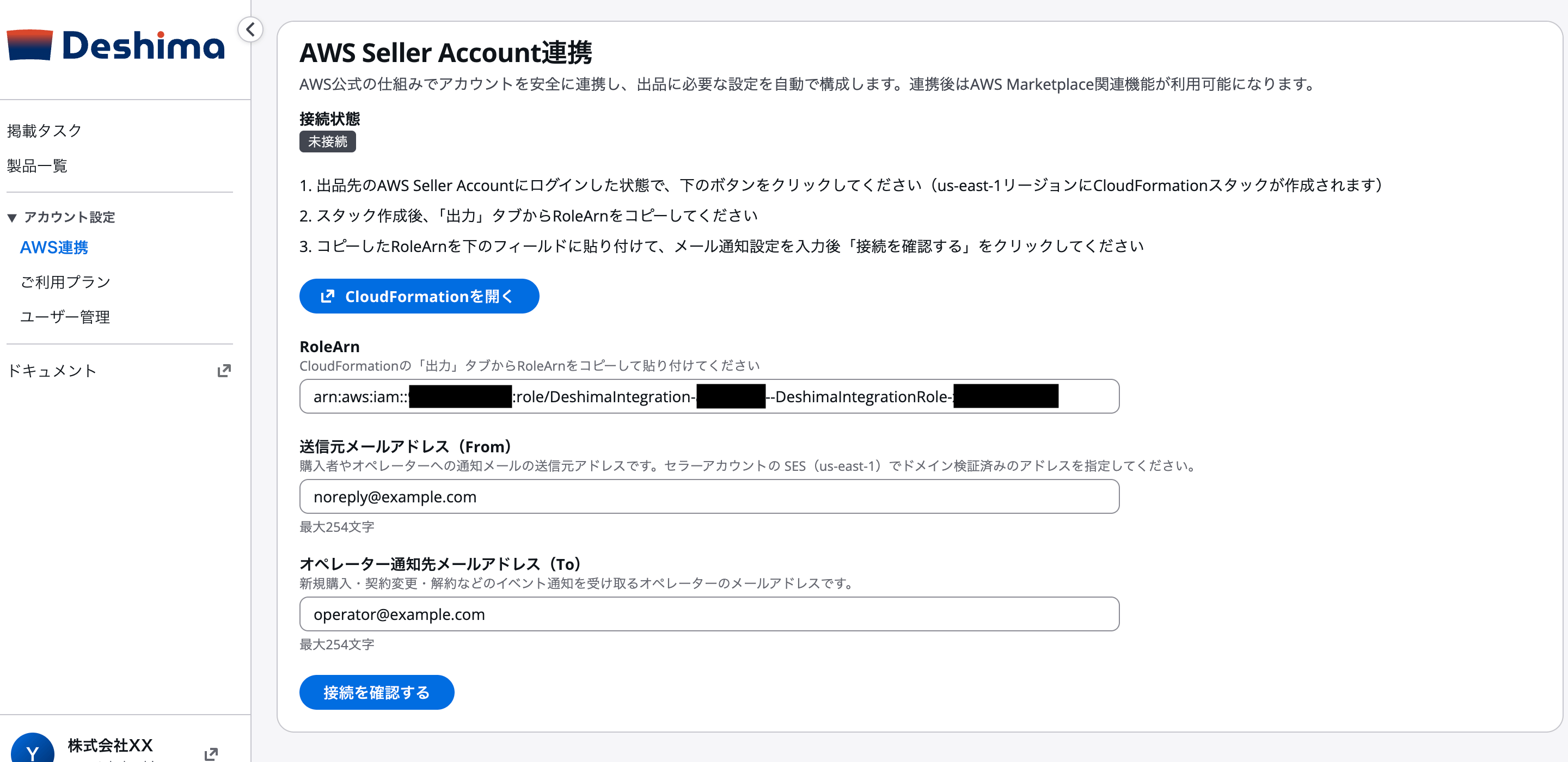 接続確認が成功すると、連携ステータスが「連携済み」に変わります。以下のAWSリソースが自動設定されており、手動でのコード実装は不要です。
| AWSリソース | 役割 |
| ------------------------------------- | ---------------------------------------------------- |
| IAMロール(DeshimaIntegrationRole) | DeshimaがResolveCustomer・GetEntitlementsを呼び出すための権限 |
| IAMロール(DeshimaEventBridgeForwardRole) | EventBridgeがDeshimaのEventBusにイベントを転送するための権限 |
| EventBridgeルール(契約更新) | License Updated - Manufacturer イベントをDeshimaに転送 |
| EventBridgeルール(契約解除) | License Deprovisioned - Manufacturer イベントをDeshimaに転送 |
**Concurrent Agreements対応済み**: DeshimaはLicenseArnベースのエンタイトルメント管理に対応しています。2026年6月1日以降の新規製品要件を満たしています。
接続確認が成功すると、連携ステータスが「連携済み」に変わります。以下のAWSリソースが自動設定されており、手動でのコード実装は不要です。
| AWSリソース | 役割 |
| ------------------------------------- | ---------------------------------------------------- |
| IAMロール(DeshimaIntegrationRole) | DeshimaがResolveCustomer・GetEntitlementsを呼び出すための権限 |
| IAMロール(DeshimaEventBridgeForwardRole) | EventBridgeがDeshimaのEventBusにイベントを転送するための権限 |
| EventBridgeルール(契約更新) | License Updated - Manufacturer イベントをDeshimaに転送 |
| EventBridgeルール(契約解除) | License Deprovisioned - Manufacturer イベントをDeshimaに転送 |
**Concurrent Agreements対応済み**: DeshimaはLicenseArnベースのエンタイトルメント管理に対応しています。2026年6月1日以降の新規製品要件を満たしています。
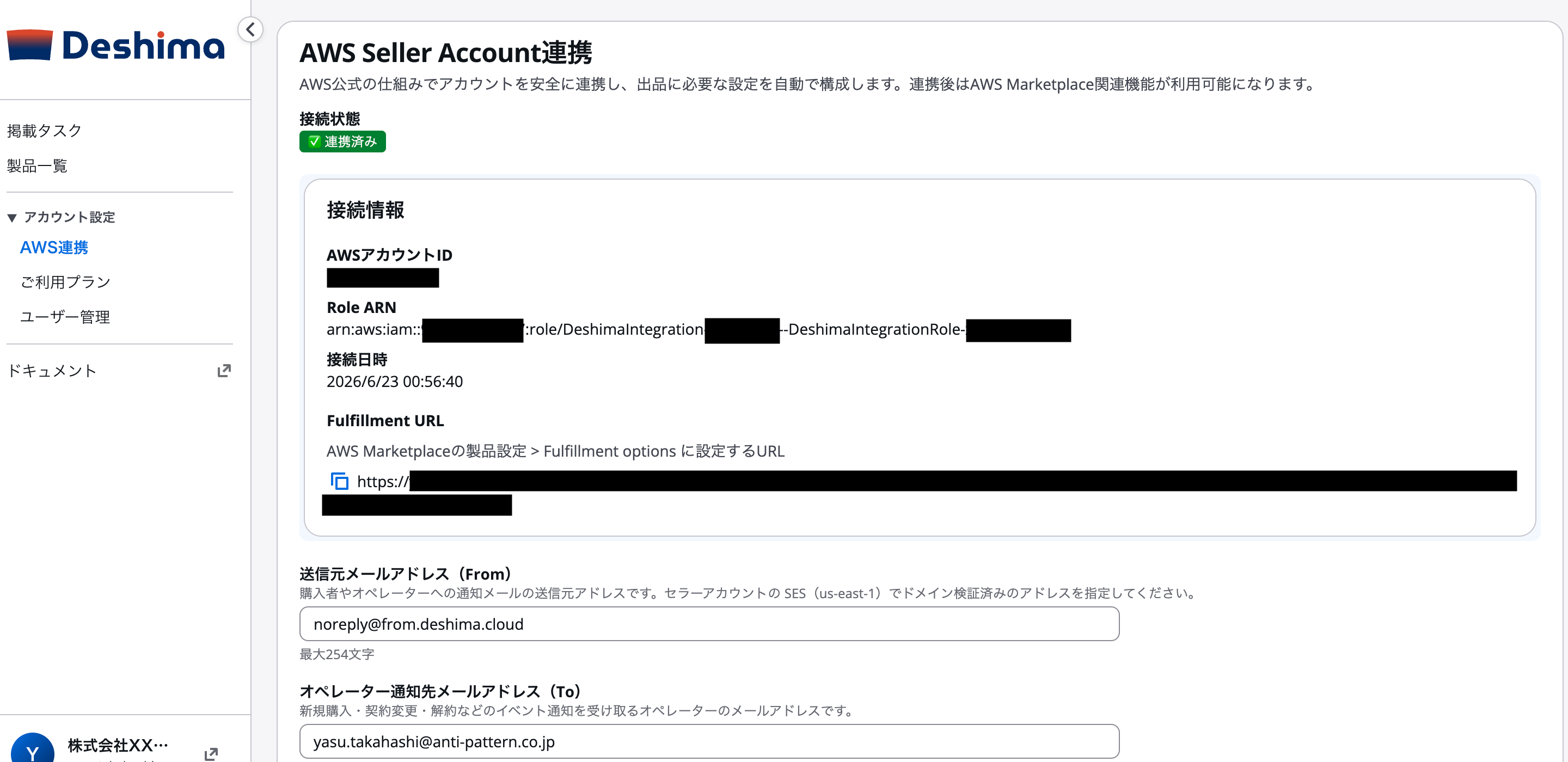 連携完了後の画面に、購入者がサブスクライブした際にリダイレクトされる **Fulfillment URL** が表示されます。このURLをAWS Marketplace Management Portalの製品設定画面に登録します。
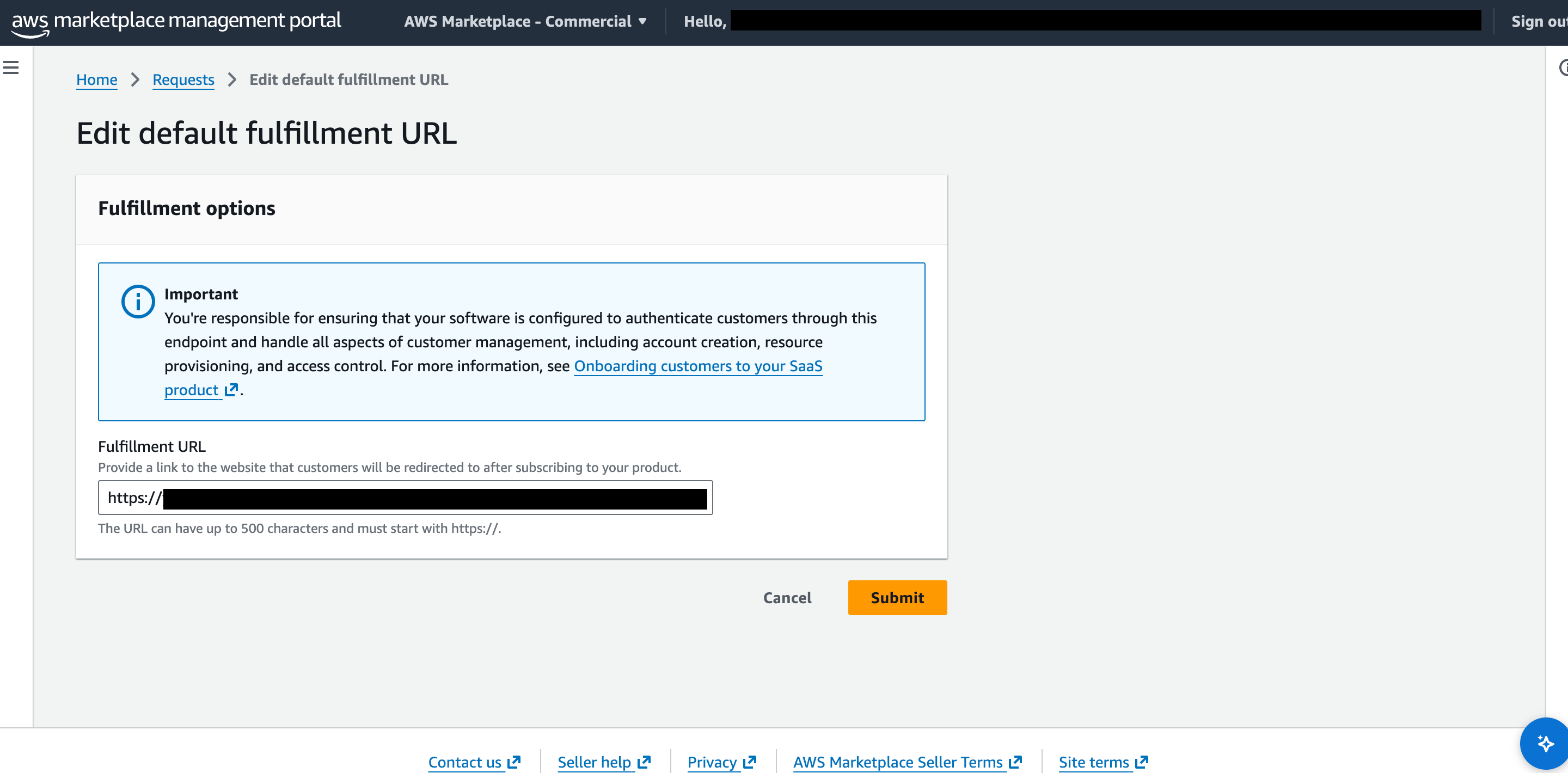 AWS Marketplace Management Portalでの製品情報登録については[Phase 4: 公開フェーズ](/guide/phase4/submission-process)で解説します。
手動実装は難易度が高く(⭐⭐⭐⭐⭐)、相当な実装工数が必要です。**Deshimaを使う場合、このタブの実装は不要です。** より高度なカスタマイズが必要な場合は[プロフェッショナルサービス](https://anti-pattern.co.jp/services/support-for-aws-marketplace-listing)もご利用いただけます。
## 概要
AWS Marketplaceは、製品とAWS Marketplaceを接続するための3つの主要APIを提供します。Deshimaが取り扱うSaaS Contractでは、ResolveCustomer(顧客登録)と GetEntitlements(エンタイトルメント確認)を使用します。BatchMeterUsage(従量課金メータリング)はContractでは使用しません。
## 3つの主要API
**顧客登録**
登録トークンを検証し、顧客情報を取得
**従量課金(Contract対象外)**
Subscription/Consumption向け。Contractでは未使用
**エンタイトルメント**
契約内容を確認
***
## Concurrent Agreements対応(2026年6月1日〜新製品必須)
**重要**: 2026年6月1日以降に作成される新規SaaS製品は、**Concurrent Agreements**への対応が必須です。これにより、同一AWSアカウントで同一製品の複数購入が可能になります。
### 変更点
Concurrent Agreements対応では、契約(エンタイトルメント)の識別が**ProductCodeベース**から**LicenseArnベース**に変わります。同一AWSアカウントで同一製品の複数契約が可能になります。
| 項目 | 従来 | Concurrent Agreements対応 |
| -------------------- | ----------------------------------------------------- | ----------------------- |
| ResolveCustomerレスポンス | CustomerIdentifier, ProductCode, CustomerAWSAccountId | + **LicenseArn** |
| 契約・利用の識別子 | ProductCode + CustomerIdentifier | **LicenseArn** |
| 同一アカウントの複数購入 | 不可 | 可能 |
### 実装上の注意
* `ResolveCustomer` APIのレスポンスに含まれる`LicenseArn`を必ず保存してください
* Contractでは`LicenseArn`単位でエンタイトルメント(`GetEntitlements`)を確認します(従量課金のメータリングは行いません)
* **同一時間帯にProductCodeベースとLicenseArnベースのメータリングを混在させると二重課金が発生します**
### ResolveCustomerレスポンス(Concurrent Agreements対応)
```json theme={null}
{
"CustomerIdentifier": "cust_abc123",
"ProductCode": "your-product-code",
"CustomerAWSAccountId": "123456789012",
"LicenseArn": "arn:aws:license-manager::123456789012:license/lic-abc123"
}
```
***
## ResolveCustomer API
顧客がAWS Marketplaceから製品を購入した際に発行される登録トークンを検証し、顧客情報を取得します。
### API仕様
**エンドポイント**:
```
POST https://metering.marketplace.us-east-1.amazonaws.com/
X-Amz-Target: AWSMPMeteringService.ResolveCustomer
```
**リクエスト**:
```json theme={null}
{
"RegistrationToken": "eyJ0eXAiOiJKV1QiLCJhbGc..."
}
```
**レスポンス**:
```json theme={null}
{
"CustomerIdentifier": "cust_abc123",
"ProductCode": "your-product-code",
"CustomerAWSAccountId": "123456789012"
}
```
### 実装例
```javascript theme={null}
const AWS = require('aws-sdk');
const marketplace = new AWS.MarketplaceMetering({
region: 'us-east-1'
});
async function resolveCustomer(registrationToken) {
const params = {
RegistrationToken: registrationToken
};
try {
const result = await marketplace.resolveCustomer(params).promise();
console.log('Customer resolved successfully');
console.log('Customer ID:', result.CustomerIdentifier);
console.log('Product Code:', result.ProductCode);
console.log('AWS Account ID:', result.CustomerAWSAccountId);
return {
customerId: result.CustomerIdentifier,
productCode: result.ProductCode,
awsAccountId: result.CustomerAWSAccountId
};
} catch (error) {
console.error('ResolveCustomer failed:', error);
if (error.code === 'InvalidTokenException') {
throw new Error('Invalid registration token');
} else if (error.code === 'ExpiredTokenException') {
throw new Error('Registration token has expired');
} else if (error.code === 'ThrottlingException') {
await new Promise(resolve => setTimeout(resolve, 1000));
return resolveCustomer(registrationToken);
}
throw error;
}
}
// 使用例
const customer = await resolveCustomer('eyJ0eXAiOiJKV1QiLCJhbGc...');
console.log('Customer:', customer);
```
```typescript theme={null}
import { MarketplaceMetering } from 'aws-sdk';
interface CustomerInfo {
customerId: string;
productCode: string;
awsAccountId: string;
}
const marketplace = new MarketplaceMetering({
region: 'us-east-1'
});
async function resolveCustomer(
registrationToken: string
): Promise {
const params: MarketplaceMetering.ResolveCustomerRequest = {
RegistrationToken: registrationToken
};
try {
const result = await marketplace.resolveCustomer(params).promise();
if (!result.CustomerIdentifier || !result.ProductCode) {
throw new Error('Invalid response from ResolveCustomer API');
}
return {
customerId: result.CustomerIdentifier,
productCode: result.ProductCode,
awsAccountId: result.CustomerAWSAccountId || ''
};
} catch (error) {
console.error('ResolveCustomer failed:', error);
throw error;
}
}
```
```python theme={null}
import boto3
from typing import Dict
marketplace = boto3.client('meteringmarketplace', region_name='us-east-1')
def resolve_customer(registration_token: str) -> Dict[str, str]:
"""
登録トークンを検証し、顧客情報を取得
Args:
registration_token: AWS Marketplaceの登録トークン
Returns:
顧客情報の辞書
Raises:
Exception: API呼び出しが失敗した場合
"""
try:
response = marketplace.resolve_customer(
RegistrationToken=registration_token
)
print('Customer resolved successfully')
print(f"Customer ID: {response['CustomerIdentifier']}")
print(f"Product Code: {response['ProductCode']}")
print(f"AWS Account ID: {response.get('CustomerAWSAccountId', 'N/A')}")
return {
'customer_id': response['CustomerIdentifier'],
'product_code': response['ProductCode'],
'aws_account_id': response.get('CustomerAWSAccountId', '')
}
except Exception as e:
print(f'ResolveCustomer failed: {str(e)}')
error_code = e.response.get('Error', {}).get('Code', '')
if error_code == 'InvalidTokenException':
raise Exception('Invalid registration token')
elif error_code == 'ExpiredTokenException':
raise Exception('Registration token has expired')
raise
# 使用例
customer = resolve_customer('eyJ0eXAiOiJKV1QiLCJhbGc...')
print('Customer:', customer)
```
### エラーハンドリング
**原因**: 登録トークンが無効または不正な形式
**対処方法**:
* トークンの形式を確認
* トークンが改変されていないか確認
* 顧客に再度購入プロセスを実行してもらう
**原因**: 登録トークンの有効期限が切れている
**対処方法**:
* トークンの有効期限は4時間
* 顧客に新しいトークンを取得してもらう
* 購入プロセスを再度実行
**原因**: API呼び出しレートが制限を超えている
**対処方法**:
```javascript theme={null}
async function resolveCustomerWithRetry(token, maxRetries = 3) {
for (let i = 0; i < maxRetries; i++) {
try {
return await resolveCustomer(token);
} catch (error) {
if (error.code === 'ThrottlingException' && i < maxRetries - 1) {
const delay = Math.pow(2, i) * 1000;
await new Promise(resolve => setTimeout(resolve, delay));
continue;
}
throw error;
}
}
}
```
***
## BatchMeterUsage API(Contract対象外)
BatchMeterUsage は従量課金(Subscription / Contract with Consumption)向けのメータリングAPIです。**Deshimaが取り扱うSaaS Contractでは使用しません**。本ガイドでは実装手順を扱いません。
## GetEntitlements API
契約ベース製品のエンタイトルメント(契約内容)を確認します。
### API仕様
**エンドポイント**:
```
POST https://entitlement.marketplace.us-east-1.amazonaws.com/
X-Amz-Target: AWSMPEntitlementService.GetEntitlements
```
**リクエスト**:
```json theme={null}
{
"ProductCode": "your-product-code",
"Filter": {
"CUSTOMER_IDENTIFIER": ["cust_abc123"]
}
}
```
**レスポンス**:
```json theme={null}
{
"Entitlements": [
{
"ProductCode": "your-product-code",
"Dimension": "Users",
"CustomerIdentifier": "cust_abc123",
"Value": {
"IntegerValue": 100
},
"ExpirationDate": "2025-01-17T10:00:00Z"
}
]
}
```
### 実装例
```javascript theme={null}
const AWS = require('aws-sdk');
const entitlement = new AWS.MarketplaceEntitlementService({
region: 'us-east-1'
});
async function getEntitlements(customerId) {
const params = {
ProductCode: process.env.AWS_MARKETPLACE_PRODUCT_CODE,
Filter: {
CUSTOMER_IDENTIFIER: [customerId]
}
};
try {
const result = await entitlement.getEntitlements(params).promise();
console.log(`Found ${result.Entitlements.length} entitlements`);
const entitlements = {};
for (const ent of result.Entitlements) {
entitlements[ent.Dimension] = {
value: ent.Value.IntegerValue || ent.Value.StringValue || ent.Value.BooleanValue,
expirationDate: ent.ExpirationDate
};
}
return entitlements;
} catch (error) {
console.error('GetEntitlements failed:', error);
throw error;
}
}
async function validateAccess(customerId, feature) {
const entitlements = await getEntitlements(customerId);
if (!entitlements[feature]) {
return false;
}
if (entitlements[feature].expirationDate) {
const expiration = new Date(entitlements[feature].expirationDate);
if (expiration < new Date()) {
return false;
}
}
return entitlements[feature].value > 0;
}
// 使用例
const hasProFeatures = await validateAccess('cust_abc123', 'ProFeatures');
if (hasProFeatures) {
console.log('Access granted to Pro features');
} else {
console.log('Access denied');
}
```
```javascript theme={null}
const NodeCache = require('node-cache');
const cache = new NodeCache({ stdTTL: 3600 }); // 1時間キャッシュ
async function getCachedEntitlements(customerId) {
const cacheKey = `entitlements:${customerId}`;
let entitlements = cache.get(cacheKey);
if (!entitlements) {
entitlements = await getEntitlements(customerId);
cache.set(cacheKey, entitlements);
console.log('Entitlements cached for:', customerId);
} else {
console.log('Entitlements retrieved from cache');
}
return entitlements;
}
function invalidateEntitlementsCache(customerId) {
const cacheKey = `entitlements:${customerId}`;
cache.del(cacheKey);
console.log('Cache invalidated for:', customerId);
}
```
```javascript theme={null}
function requireEntitlement(dimension) {
return async (req, res, next) => {
const customerId = req.headers['x-customer-id'];
if (!customerId) {
return res.status(401).json({ error: 'Customer ID required' });
}
try {
const hasAccess = await validateAccess(customerId, dimension);
if (!hasAccess) {
return res.status(403).json({
error: 'Access denied',
message: `This feature requires ${dimension} entitlement`
});
}
req.entitlements = await getCachedEntitlements(customerId);
next();
} catch (error) {
console.error('Entitlement check failed:', error);
return res.status(500).json({ error: 'Internal server error' });
}
};
}
// 使用例
app.get('/api/pro-feature',
requireEntitlement('ProFeatures'),
(req, res) => {
res.json({ message: 'Pro feature accessed' });
}
);
```
***
## EventBridgeによるイベント通知
AWS Marketplaceは顧客のサブスクリプションイベント(契約更新・解除)をEventBridge経由で配信します。以下の設定が必要です。
### 受信するイベント
| イベント | タイミング |
| ------------------------------------ | -------- |
| License Updated - Manufacturer | 契約更新・変更時 |
| License Deprovisioned - Manufacturer | 契約解除時 |
### EventBridgeルールの設定
```json theme={null}
{
"detail-type": [
"License Updated - Manufacturer",
"License Deprovisioned - Manufacturer"
]
}
```
ターゲット(Lambda関数、SQSキューなど)を設定し、EventBridgeがターゲットにイベントを配信するためのIAMロールを作成します。
AWS MarketplaceのSNS通知は将来的に廃止予定です。新規製品ではEventBridgeで実装してください。[AWS公式ドキュメント →](https://docs.aws.amazon.com/marketplace/latest/userguide/saas-notification.html)
***
## 次のステップ
購入者向けフォームの設定
AWS Marketplace Management Portalでの製品情報登録については[Phase 4: 公開フェーズ](/guide/phase4/submission-process)で解説します。
手動実装は難易度が高く(⭐⭐⭐⭐⭐)、相当な実装工数が必要です。**Deshimaを使う場合、このタブの実装は不要です。** より高度なカスタマイズが必要な場合は[プロフェッショナルサービス](https://anti-pattern.co.jp/services/support-for-aws-marketplace-listing)もご利用いただけます。
## 概要
AWS Marketplaceは、製品とAWS Marketplaceを接続するための3つの主要APIを提供します。Deshimaが取り扱うSaaS Contractでは、ResolveCustomer(顧客登録)と GetEntitlements(エンタイトルメント確認)を使用します。BatchMeterUsage(従量課金メータリング)はContractでは使用しません。
## 3つの主要API
**顧客登録**
登録トークンを検証し、顧客情報を取得
**従量課金(Contract対象外)**
Subscription/Consumption向け。Contractでは未使用
**エンタイトルメント**
契約内容を確認
***
## Concurrent Agreements対応(2026年6月1日〜新製品必須)
**重要**: 2026年6月1日以降に作成される新規SaaS製品は、**Concurrent Agreements**への対応が必須です。これにより、同一AWSアカウントで同一製品の複数購入が可能になります。
### 変更点
Concurrent Agreements対応では、契約(エンタイトルメント)の識別が**ProductCodeベース**から**LicenseArnベース**に変わります。同一AWSアカウントで同一製品の複数契約が可能になります。
| 項目 | 従来 | Concurrent Agreements対応 |
| -------------------- | ----------------------------------------------------- | ----------------------- |
| ResolveCustomerレスポンス | CustomerIdentifier, ProductCode, CustomerAWSAccountId | + **LicenseArn** |
| 契約・利用の識別子 | ProductCode + CustomerIdentifier | **LicenseArn** |
| 同一アカウントの複数購入 | 不可 | 可能 |
### 実装上の注意
* `ResolveCustomer` APIのレスポンスに含まれる`LicenseArn`を必ず保存してください
* Contractでは`LicenseArn`単位でエンタイトルメント(`GetEntitlements`)を確認します(従量課金のメータリングは行いません)
* **同一時間帯にProductCodeベースとLicenseArnベースのメータリングを混在させると二重課金が発生します**
### ResolveCustomerレスポンス(Concurrent Agreements対応)
```json theme={null}
{
"CustomerIdentifier": "cust_abc123",
"ProductCode": "your-product-code",
"CustomerAWSAccountId": "123456789012",
"LicenseArn": "arn:aws:license-manager::123456789012:license/lic-abc123"
}
```
***
## ResolveCustomer API
顧客がAWS Marketplaceから製品を購入した際に発行される登録トークンを検証し、顧客情報を取得します。
### API仕様
**エンドポイント**:
```
POST https://metering.marketplace.us-east-1.amazonaws.com/
X-Amz-Target: AWSMPMeteringService.ResolveCustomer
```
**リクエスト**:
```json theme={null}
{
"RegistrationToken": "eyJ0eXAiOiJKV1QiLCJhbGc..."
}
```
**レスポンス**:
```json theme={null}
{
"CustomerIdentifier": "cust_abc123",
"ProductCode": "your-product-code",
"CustomerAWSAccountId": "123456789012"
}
```
### 実装例
```javascript theme={null}
const AWS = require('aws-sdk');
const marketplace = new AWS.MarketplaceMetering({
region: 'us-east-1'
});
async function resolveCustomer(registrationToken) {
const params = {
RegistrationToken: registrationToken
};
try {
const result = await marketplace.resolveCustomer(params).promise();
console.log('Customer resolved successfully');
console.log('Customer ID:', result.CustomerIdentifier);
console.log('Product Code:', result.ProductCode);
console.log('AWS Account ID:', result.CustomerAWSAccountId);
return {
customerId: result.CustomerIdentifier,
productCode: result.ProductCode,
awsAccountId: result.CustomerAWSAccountId
};
} catch (error) {
console.error('ResolveCustomer failed:', error);
if (error.code === 'InvalidTokenException') {
throw new Error('Invalid registration token');
} else if (error.code === 'ExpiredTokenException') {
throw new Error('Registration token has expired');
} else if (error.code === 'ThrottlingException') {
await new Promise(resolve => setTimeout(resolve, 1000));
return resolveCustomer(registrationToken);
}
throw error;
}
}
// 使用例
const customer = await resolveCustomer('eyJ0eXAiOiJKV1QiLCJhbGc...');
console.log('Customer:', customer);
```
```typescript theme={null}
import { MarketplaceMetering } from 'aws-sdk';
interface CustomerInfo {
customerId: string;
productCode: string;
awsAccountId: string;
}
const marketplace = new MarketplaceMetering({
region: 'us-east-1'
});
async function resolveCustomer(
registrationToken: string
): Promise {
const params: MarketplaceMetering.ResolveCustomerRequest = {
RegistrationToken: registrationToken
};
try {
const result = await marketplace.resolveCustomer(params).promise();
if (!result.CustomerIdentifier || !result.ProductCode) {
throw new Error('Invalid response from ResolveCustomer API');
}
return {
customerId: result.CustomerIdentifier,
productCode: result.ProductCode,
awsAccountId: result.CustomerAWSAccountId || ''
};
} catch (error) {
console.error('ResolveCustomer failed:', error);
throw error;
}
}
```
```python theme={null}
import boto3
from typing import Dict
marketplace = boto3.client('meteringmarketplace', region_name='us-east-1')
def resolve_customer(registration_token: str) -> Dict[str, str]:
"""
登録トークンを検証し、顧客情報を取得
Args:
registration_token: AWS Marketplaceの登録トークン
Returns:
顧客情報の辞書
Raises:
Exception: API呼び出しが失敗した場合
"""
try:
response = marketplace.resolve_customer(
RegistrationToken=registration_token
)
print('Customer resolved successfully')
print(f"Customer ID: {response['CustomerIdentifier']}")
print(f"Product Code: {response['ProductCode']}")
print(f"AWS Account ID: {response.get('CustomerAWSAccountId', 'N/A')}")
return {
'customer_id': response['CustomerIdentifier'],
'product_code': response['ProductCode'],
'aws_account_id': response.get('CustomerAWSAccountId', '')
}
except Exception as e:
print(f'ResolveCustomer failed: {str(e)}')
error_code = e.response.get('Error', {}).get('Code', '')
if error_code == 'InvalidTokenException':
raise Exception('Invalid registration token')
elif error_code == 'ExpiredTokenException':
raise Exception('Registration token has expired')
raise
# 使用例
customer = resolve_customer('eyJ0eXAiOiJKV1QiLCJhbGc...')
print('Customer:', customer)
```
### エラーハンドリング
**原因**: 登録トークンが無効または不正な形式
**対処方法**:
* トークンの形式を確認
* トークンが改変されていないか確認
* 顧客に再度購入プロセスを実行してもらう
**原因**: 登録トークンの有効期限が切れている
**対処方法**:
* トークンの有効期限は4時間
* 顧客に新しいトークンを取得してもらう
* 購入プロセスを再度実行
**原因**: API呼び出しレートが制限を超えている
**対処方法**:
```javascript theme={null}
async function resolveCustomerWithRetry(token, maxRetries = 3) {
for (let i = 0; i < maxRetries; i++) {
try {
return await resolveCustomer(token);
} catch (error) {
if (error.code === 'ThrottlingException' && i < maxRetries - 1) {
const delay = Math.pow(2, i) * 1000;
await new Promise(resolve => setTimeout(resolve, delay));
continue;
}
throw error;
}
}
}
```
***
## BatchMeterUsage API(Contract対象外)
BatchMeterUsage は従量課金(Subscription / Contract with Consumption)向けのメータリングAPIです。**Deshimaが取り扱うSaaS Contractでは使用しません**。本ガイドでは実装手順を扱いません。
## GetEntitlements API
契約ベース製品のエンタイトルメント(契約内容)を確認します。
### API仕様
**エンドポイント**:
```
POST https://entitlement.marketplace.us-east-1.amazonaws.com/
X-Amz-Target: AWSMPEntitlementService.GetEntitlements
```
**リクエスト**:
```json theme={null}
{
"ProductCode": "your-product-code",
"Filter": {
"CUSTOMER_IDENTIFIER": ["cust_abc123"]
}
}
```
**レスポンス**:
```json theme={null}
{
"Entitlements": [
{
"ProductCode": "your-product-code",
"Dimension": "Users",
"CustomerIdentifier": "cust_abc123",
"Value": {
"IntegerValue": 100
},
"ExpirationDate": "2025-01-17T10:00:00Z"
}
]
}
```
### 実装例
```javascript theme={null}
const AWS = require('aws-sdk');
const entitlement = new AWS.MarketplaceEntitlementService({
region: 'us-east-1'
});
async function getEntitlements(customerId) {
const params = {
ProductCode: process.env.AWS_MARKETPLACE_PRODUCT_CODE,
Filter: {
CUSTOMER_IDENTIFIER: [customerId]
}
};
try {
const result = await entitlement.getEntitlements(params).promise();
console.log(`Found ${result.Entitlements.length} entitlements`);
const entitlements = {};
for (const ent of result.Entitlements) {
entitlements[ent.Dimension] = {
value: ent.Value.IntegerValue || ent.Value.StringValue || ent.Value.BooleanValue,
expirationDate: ent.ExpirationDate
};
}
return entitlements;
} catch (error) {
console.error('GetEntitlements failed:', error);
throw error;
}
}
async function validateAccess(customerId, feature) {
const entitlements = await getEntitlements(customerId);
if (!entitlements[feature]) {
return false;
}
if (entitlements[feature].expirationDate) {
const expiration = new Date(entitlements[feature].expirationDate);
if (expiration < new Date()) {
return false;
}
}
return entitlements[feature].value > 0;
}
// 使用例
const hasProFeatures = await validateAccess('cust_abc123', 'ProFeatures');
if (hasProFeatures) {
console.log('Access granted to Pro features');
} else {
console.log('Access denied');
}
```
```javascript theme={null}
const NodeCache = require('node-cache');
const cache = new NodeCache({ stdTTL: 3600 }); // 1時間キャッシュ
async function getCachedEntitlements(customerId) {
const cacheKey = `entitlements:${customerId}`;
let entitlements = cache.get(cacheKey);
if (!entitlements) {
entitlements = await getEntitlements(customerId);
cache.set(cacheKey, entitlements);
console.log('Entitlements cached for:', customerId);
} else {
console.log('Entitlements retrieved from cache');
}
return entitlements;
}
function invalidateEntitlementsCache(customerId) {
const cacheKey = `entitlements:${customerId}`;
cache.del(cacheKey);
console.log('Cache invalidated for:', customerId);
}
```
```javascript theme={null}
function requireEntitlement(dimension) {
return async (req, res, next) => {
const customerId = req.headers['x-customer-id'];
if (!customerId) {
return res.status(401).json({ error: 'Customer ID required' });
}
try {
const hasAccess = await validateAccess(customerId, dimension);
if (!hasAccess) {
return res.status(403).json({
error: 'Access denied',
message: `This feature requires ${dimension} entitlement`
});
}
req.entitlements = await getCachedEntitlements(customerId);
next();
} catch (error) {
console.error('Entitlement check failed:', error);
return res.status(500).json({ error: 'Internal server error' });
}
};
}
// 使用例
app.get('/api/pro-feature',
requireEntitlement('ProFeatures'),
(req, res) => {
res.json({ message: 'Pro feature accessed' });
}
);
```
***
## EventBridgeによるイベント通知
AWS Marketplaceは顧客のサブスクリプションイベント(契約更新・解除)をEventBridge経由で配信します。以下の設定が必要です。
### 受信するイベント
| イベント | タイミング |
| ------------------------------------ | -------- |
| License Updated - Manufacturer | 契約更新・変更時 |
| License Deprovisioned - Manufacturer | 契約解除時 |
### EventBridgeルールの設定
```json theme={null}
{
"detail-type": [
"License Updated - Manufacturer",
"License Deprovisioned - Manufacturer"
]
}
```
ターゲット(Lambda関数、SQSキューなど)を設定し、EventBridgeがターゲットにイベントを配信するためのIAMロールを作成します。
AWS MarketplaceのSNS通知は将来的に廃止予定です。新規製品ではEventBridgeで実装してください。[AWS公式ドキュメント →](https://docs.aws.amazon.com/marketplace/latest/userguide/saas-notification.html)
***
## 次のステップ
購入者向けフォームの設定